Flipped instruction is something that has been gaining interest in my district for the last couple of years. Flipped instruction is when you use a combination of online and face-to-face interaction to deliver content. There is a variety of methods to this and rather than re-explain, you can see them here.
One question that comes into play when thinking about Art Education, is how can you flip it? Or maybe better: Why would you want to? Art class is so hands-on, what really can flipping instruction do to benefit instruction in an art room. Here are 3 ways to Flip Art Education:
1. Sub plans: Nothing is worse than trying to prepare Art sub plans. More likely than not, the person coming in to take over has little to no experience using Art materials and the students are probably going to have a hard time figuring out what to do without your guidance. A couple of ways to combat this through the Flip model is recording a video of yourself explaining what needs to happen for the Sub to show students (or if the kids have access to computers, they can watch it at their own pace). That way they can see what you want them to do and the expectation is more clear than a sub trying to decipher your notes. I also tell students to email me when I am out if they hit a snag in a project and I try to talk them through it via email. It makes the students feel in control and me at ease when I am not there.
2. Snow Days: Today was the 5th one in my district. I am not complaining, but it does mean that I have lost a week's worth of instructional time with students. Instead of completely giving up on a lesson or presentation that you were planning to give on a Snow Day, you could create a video recording of it and email it to parents/students to view before returning to class the next day. I try to keep videos like this to ten minutes or less. It never takes the place of me being there in class and not all students will take the time to view it, but it does offer students the opportunity to get prepared for when we return to class the next day. Those students who do view can then take the lead in explaining the process and help others get on track with what we are doing.
3. Differentiate Pacing: What do you do with the student who is always ready to move onto the next assignment? What about students who are gone on vacation or sick? One thing you could offer is the resources for the assignment online. I house all of my projects on our Moodle page and students can check out what we are going to to do next when finishing their current projects. Sometimes I will make videos available that showcase an artist or go through a presentation I or other students have prepared. This allows students to move ahead when they are ready or get caught up if they are behind.
Imagine less time lecturing or presenting about Artists in class and more time for making Art. What might happen when students share their learning with parents by watching those presentations at home? Think of the potential this type of model offers the Art classroom when it is employed effectively. There are many tools you can use to create screen castings or videos. Two I frequent are Camtasia Relay by TechSmith and Quicktime on the Mac.
If you are interested in learning more about this type of instructional model and would like a chance to talk technology with other forward-thinking teachers, check out the upcoming PD at the GRAM this Saturday - it is only $5 for MAEA members. If you have used this type of instruction in your classroom, what are some tips or tricks you can offer others? If you have not, do you think you will? What are some potential issues that you see from using this strategy?
Tuesday, February 19, 2013

Friday, January 11, 2013
Transforming Minds
Happy New Year! Even though I say I am not going to, it seems like every year I get sucked into some type of resolution. I start out with good intentions and usually somewhere around March realize I had gotten off track.
A couple of years ago, I started my class blog as a New Year's goal. It has been my most successful New Year's venture to date. I find the documenting of student growth and work to be a great reflective tool for myself and something my students enjoy as well. That is why I was excited to spend my first Saturday of the year with Art teachers in Oakland Schools, talking about technology, assessment, and how they can work together in the Visual Arts classroom to meet a variety of needs.
Claudia Burns also presented at the Transforming Minds conference on the topic of assessment. Her helpful resources will soon be available on the MAEA website.
As we move into 2013, the topic of assessment is going to be more and more prevalent. We have to figure out how we are going to document student growth that will be put towards our evaluations. Claudia has really helped get the conversation going, by providing examples of assessment tools and sample assessments that could be used in the classroom. I hope to add to the conversation by providing examples of how the use of technology can aide in our effort with documenting student growth through my collaboration on this blog and others.
In addition to blogging, I also document the efforts in my classroom through Artsonia. This online gallery offers teachers a place to house digital images of student work over the course of their schooling career. Imagine being able to have students go back after years and reflect on their progress in various aspects of art making. I also use Google Forms and Moodle to create tests that help me quickly assess student knowledge, without having to spend time manually grading them. If you are interested in learning about any of these tools, you can find me at the January 19th Flip Teaching Conference at Byron Center High School. The event is free and lunch is provided - what more can I say!
If you are interested in helping shape the future of Assessments in the Arts in Michigan, you can apply to participate in the Michigan's Model Arts Education Instruction and Assessment Project. The deadline for application is January 21st.
What are some ways you are using assessment to document student growth. What are some tools available that help you show student growth?
A couple of years ago, I started my class blog as a New Year's goal. It has been my most successful New Year's venture to date. I find the documenting of student growth and work to be a great reflective tool for myself and something my students enjoy as well. That is why I was excited to spend my first Saturday of the year with Art teachers in Oakland Schools, talking about technology, assessment, and how they can work together in the Visual Arts classroom to meet a variety of needs.
Claudia Burns also presented at the Transforming Minds conference on the topic of assessment. Her helpful resources will soon be available on the MAEA website.
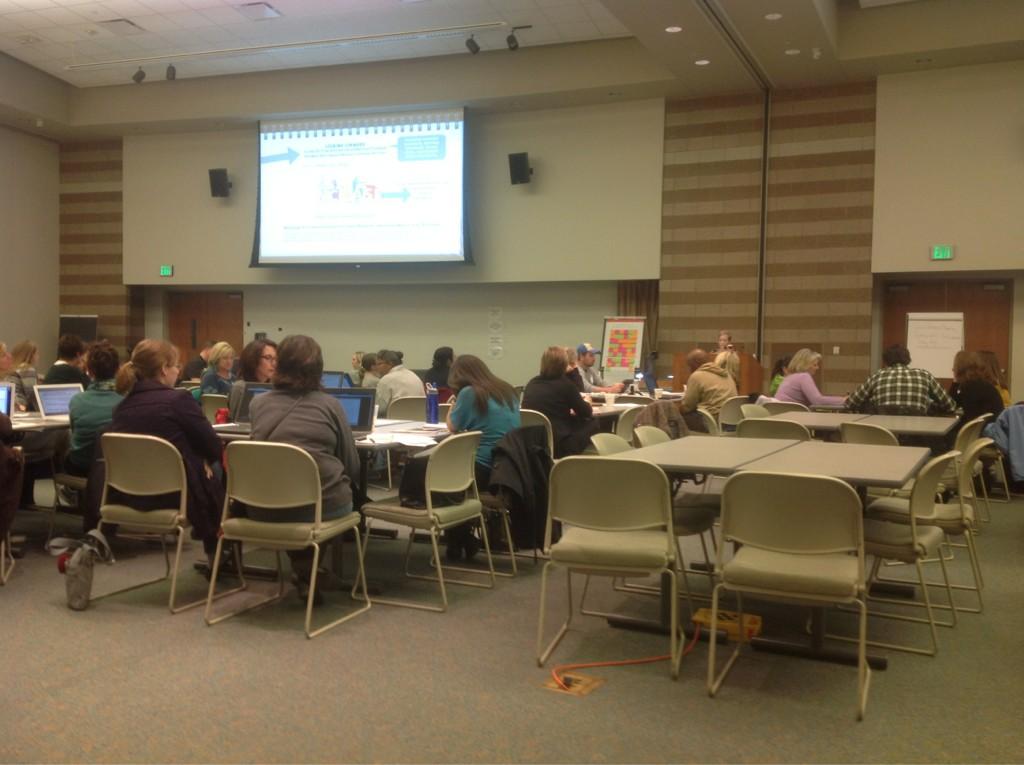 |
| Claudia Burns presented at the January 5th conference in Oakland on the topic of Assessment. |
As we move into 2013, the topic of assessment is going to be more and more prevalent. We have to figure out how we are going to document student growth that will be put towards our evaluations. Claudia has really helped get the conversation going, by providing examples of assessment tools and sample assessments that could be used in the classroom. I hope to add to the conversation by providing examples of how the use of technology can aide in our effort with documenting student growth through my collaboration on this blog and others.
In addition to blogging, I also document the efforts in my classroom through Artsonia. This online gallery offers teachers a place to house digital images of student work over the course of their schooling career. Imagine being able to have students go back after years and reflect on their progress in various aspects of art making. I also use Google Forms and Moodle to create tests that help me quickly assess student knowledge, without having to spend time manually grading them. If you are interested in learning about any of these tools, you can find me at the January 19th Flip Teaching Conference at Byron Center High School. The event is free and lunch is provided - what more can I say!
If you are interested in helping shape the future of Assessments in the Arts in Michigan, you can apply to participate in the Michigan's Model Arts Education Instruction and Assessment Project. The deadline for application is January 21st.
What are some ways you are using assessment to document student growth. What are some tools available that help you show student growth?
Monday, December 3, 2012
Documenting with iPads
My school recently passed a bond, which has allowed major technology upgrades to our classrooms. As a part of the equipment brought into the classroom, teachers were given iPads and taught basic methods of using them to deliver content and create resources for the classroom. I had been wanting an iPad for quite a while; there are so many great teachers who implement their use in the Art classroom and I wanted to do the same.
Unfortunately, since obtaining the device my creation of "art" has not been as frequent as I would like - since I do not have a class set to use with students, I have not done as much with production other than using it to take pictures and video and make presentations for class. Although my digital paintings have been sparse, the impact that simply documenting work with the iPad has made a tremendous difference in my ability to reflect on what I teach and how students work daily.
I recently spoke with a colleague who had been evaluated and mentioned how they wished the administrator could have been there longer or at a different time. We have all been there. I know I have. That feeling got me thinking about how I can use the iPad within the teacher evaluation system to show more than just a snapshot of what happens within my classroom. Instead of just looking at a short period of time when the administrator was able to come in and observe, by taping various projects or segments of learning, I can start offering a more complete and better representation of what happens in the classroom. When using this in during the review of a classroom observation, it can reveal different experiences that occur and help give a more complete picture of what it is you do as a teacher.
I think that is why I appreciate blogging so much as a part of my daily practice. It offers me a chance to give a complete picture of what happens in my classroom and hopefully allows others a chance to understand what it means to be an art student in my school. I also get a chance to reflect on what worked and what didn't, which impacts what and how I teach in the future.
How do you use iPads in your classroom? Do you document learning activities through blogs of videos and have you used that to impact your evaluation? I am interested in hearing from others on this topic as it is something I am just starting to explore. I look forward to your comments and learning more about how you approach the documentation of learning in your own classroom.
Unfortunately, since obtaining the device my creation of "art" has not been as frequent as I would like - since I do not have a class set to use with students, I have not done as much with production other than using it to take pictures and video and make presentations for class. Although my digital paintings have been sparse, the impact that simply documenting work with the iPad has made a tremendous difference in my ability to reflect on what I teach and how students work daily.
 |
| Artists Name: Katie M. School: Grand Ledge HS |
I recently spoke with a colleague who had been evaluated and mentioned how they wished the administrator could have been there longer or at a different time. We have all been there. I know I have. That feeling got me thinking about how I can use the iPad within the teacher evaluation system to show more than just a snapshot of what happens within my classroom. Instead of just looking at a short period of time when the administrator was able to come in and observe, by taping various projects or segments of learning, I can start offering a more complete and better representation of what happens in the classroom. When using this in during the review of a classroom observation, it can reveal different experiences that occur and help give a more complete picture of what it is you do as a teacher.
I think that is why I appreciate blogging so much as a part of my daily practice. It offers me a chance to give a complete picture of what happens in my classroom and hopefully allows others a chance to understand what it means to be an art student in my school. I also get a chance to reflect on what worked and what didn't, which impacts what and how I teach in the future.
How do you use iPads in your classroom? Do you document learning activities through blogs of videos and have you used that to impact your evaluation? I am interested in hearing from others on this topic as it is something I am just starting to explore. I look forward to your comments and learning more about how you approach the documentation of learning in your own classroom.
Sunday, November 18, 2012
Chance Favors the Connected Mind
It’s been three weeks now
since I came home from the conference weekend in Traverse City. So much has
happened since then: the elections, the quarter ended, grades had to be
completed, new lessons begun.
On Friday, Jan Cramer from
Battle Creek posted on Facebook: “Tests and
projects graded, 50 Kindergarten empty bowls drying, student holiday art/cards
matted and framed, PLC meeting agenda copied, kiln loaded and firing, materials
ready to go for Mon. and Tues....this is how I spent my Friday night.” We can
all relate to her post, can’t we?
Amidst all the
complexities of life I crave and cherish tranquil moments—moments that I allow
myself for creative reflection. Recently I came across this video by Steven
Johnson, considering “Where Good Ideas Come From”, also the title of his recent
book.
We can look at Facebook or
Twitter or Pinterest or texting or any other form of communication as a
distraction, another complexity but then again we can consider them connectivity, which is what the 21st century is all
about, isn’t it?
One of my biggest
challenges in my role as MAEA High School Division Co-chair is that very
notion: other than at the conference how do we connect? I see this blog as a tiny possibility
that could grow into something far more than it is now. Jeanine has set the
blog up so that we have tabs for each level: HS, MS, El. And now: Assessment.
Lots of teachers are concerned about this area. So let’s talk about it! Let’s
take advantage of this way of connecting.
And if you have an idea, a
hunch, bring it up, and maybe someone else will have a hunch and maybe those
hunches will collide, mingle and create new forms.
So here’s the plan: I will
set up a schedule for high school teachers to start the ball rolling. I already
have ten of you interested in writing for the blog on occasion. I’ll e-mail you
and set up a schedule. It can be an interview, a lesson idea, a student success
story, or simply a creative idea that you want to talk about. Let us know if
you want to join the party, if you want to write, e-mail me.
If you are an elementary
or middle school teacher we have a tab for you, too!
But what I’d really like
to see is dialogue after the authors post an article.
Voice an opinion, an
affirmation, start a disagreement, share an example or tell a story. We’d love
to hear your voice! Claudia: burnsc@aaps.k12.mi.us
Wednesday, November 7, 2012
What did you Learn?
It has been a couple of weeks since the MAEA Fall 2012 Conference, and I am still sorting through bags of handouts, sample materials, and pictures that are filled with great ideas and classroom inspiration. This conference had it all - great views of Traverse City, awesome sessions with expert teachers, and loads of ideas to take back and implement into the classroom. Here are a couple of take-aways that will be helping me through this year:
 1. Assessment: Claudia Burns had a great Thursday night session on Assessment where teachers were able to share how they are working with the new evaluation requirement to show student growth. Teachers gave examples of how the implement both formative and summative assessment tools as well as the resources they use to help with pre and post testing. You will notice a new tab on our blog labeled "Assessment" - Claudia will be putting resource materials on there to help you get started or advance your understanding of how this works in an art classroom.
 2. Creativity: There were several sessions that had creativity at the heart of it. Adam VanHouten, September Buys, and Cindy Todd gave presentations dealing with aspects of creativity in the classroom. I enjoyed learning about various methods of instruction to help foster innovative thinking. Both Adam and September used www.prezi.com to create interactive presentations on how they apply this in their classrooms.
 3. Workshops: The amount of hands-on opportunities this conference did not disappoint. Sharon Stratton gave an awesome workshop that not only gave great resources for using unusual materials like tar paper, bleach, and soap to make awesome works of art, but also included pop-rocks in her presentation (which was a sweet surprise). The vendors also did not disappoint with their samples and make-and-takes which helps when deciding if you want to purchase products on display.

4. Data: One of the best moments was the presentation by Dr. Root-Bernstein. His keynote on the link between the Arts and everything else put hard facts and figures to something we always have felt to be true: that when you invest in the Arts, you are investing in all other aspects of learning. It was a great talk and I look forward to reading his book that goes into the topic further.
Overall, this was a great conference to attend. It was full of information and moments to connect with others. Conferences like these are important for our profession. What was your favorite part of MAEA 2012? Please share links, pictures, and information below so we can archive the highlights of this year's conference.
4. Data: One of the best moments was the presentation by Dr. Root-Bernstein. His keynote on the link between the Arts and everything else put hard facts and figures to something we always have felt to be true: that when you invest in the Arts, you are investing in all other aspects of learning. It was a great talk and I look forward to reading his book that goes into the topic further.
Overall, this was a great conference to attend. It was full of information and moments to connect with others. Conferences like these are important for our profession. What was your favorite part of MAEA 2012? Please share links, pictures, and information below so we can archive the highlights of this year's conference.
Thursday, October 25, 2012
Ready to Go!
Today is the start of the annual MAEA Conference and I am so excited! It is a great time to connect with other teachers from around the state and share information on what works best in Art Education. It is a time where I learn so much from my peers and receive the valuable resources that allow my classroom to thrive and grow.
 |
| Artists Name: Samantha J. School: Heritage HS |
If you are attending MAEA this weekend, here are some tips that I have found helpful when attending any conference:
1. Have a plan: Go through the Conference booklet (available online) to help plan out what you want to attend and when they are taking place. Also have a back-up plan in case your first choice fills up too quickly. With the new mobile feature on the MAEA site, you can easily do this through your smartphone or tablet.
2. Ask questions: If you attend a session and you want to know more about something that was said by the presenter, make sure to ask. As a presenter, I want to make sure my presentation is relevant and helpful to the audience. If there is something that you want to know more about, just ask.
3. Check out the Vendors: I think my favorite part is checking out the booths from the great Vendors that come to MAEA. Not only do you end up with bags full of samples, but there are opportunities to participate in "Make and Takes" and talk with knowledgable spokespeople from the companies represented. If you have questions about purchasing supplies, new equipment, or other resources, this is a great time to connect and research through first hand experience.
4. Student Work: Make sure to take the time and check out the great student work on display. I am always amazed at the talent and creativity each year during our conference. It is also a great time to get ideas from other teachers by seeing how they taught a lesson so you can adapt it in your own classroom.
5. Tweet it out: Please use the hashtag #MAEA12 to tweet any important ideas or information you gained from this conference. This allows ideas to be shared from a variety of sessions - it will be like you can experience being in more places at once! When the conference is complete, I will post the resource here so that we can all enjoy the conference over and over again!
I hope you have the best experience this weekend at the conference. If you are unable to attend, follow #MAEA12 to get updates on the new lessons learned throughout this weekend of learning and sharing in Art Education.
Sunday, September 30, 2012
Partnering with Parents
 |
| 2012 State Adjudication: Laura B. |
Instead of bearing the burden on your own, here are a couple of ideas on how to enlist parents to help along the school year:
1. Just Ask. Parents are interested in what happens in their child's school and there are many who would love to spend a day in the Art room helping organize materials, displays, or assisting with students. To make this a successful experience, make sure you have a specific idea of what that parent will be doing when they come into your classroom as well as communicate those ideas beforehand to make sure you are both on the same page.
2. Communicate your needs in multiple ways. Email is just one way to communicate with parents about activities that are happening in the classroom. You can also start a blog, create a twitter account, or a facebook page to help keep parents connected (make sure you comply with your school's technology policy first). If you participate in Artsonia, you can use their newsletter feature to be emailed to parents and then embed the form in your blog or website.
3. Take a poll. Google forms allows you to create a survey to share and gather information from others. I recently created a survey for parents to see how they feel about how the school year is going so far. The form automatically calculates the data and shows it to you in graphs or charts. This allows for parents to share their ideas and for you to get quick and honest feedback.
Do you have a great way for getting parents involved in your classroom? Please share your ideas below and help make this school year one filled with positive involvement!
Subscribe to:
Posts (Atom)